
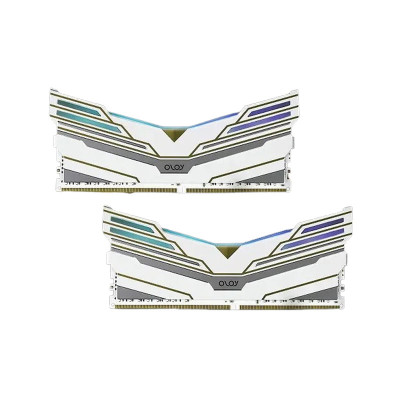
/oloy-warhawk-8gb-ram-04-400x400.jpg "OLOY Warhawk 8GB 3200MHZ DDR4 RGB Desktop RAM")
/oloy-warhawk-8gb-ram-03-400x400.jpg "OLOY Warhawk 8GB 3200MHZ DDR4 RGB Desktop RAM")
/oloy-warhawk-8gb-ram-02-400x400.jpg "OLOY Warhawk 8GB 3200MHZ DDR4 RGB Desktop RAM")
/oloy-warhawk-8gb-ram-05-400x400.jpg "OLOY Warhawk 8GB 3200MHZ DDR4 RGB Desktop RAM")

| Key Features | ||
| Type | DDR4 | |
| Capacity | 8GB | |
| Frequency | 3200 MHz CL16 | |
| Operating voltage | 1.35V | |
| Physical dimension | ||
| Dimension | 14.3 x 6.1 x 0.7 cm | |
| Warranty Information | ||
| Warranty | Life Time | |
OLOY Warhawk 8GB 3200MHz DDR4 RGB Desktop RAM is a stylish and capable memory upgrade for gaming PCs, home computers, and everyday desktop systems. With 8GB capacity, 3200MHz speed, CL16 timing, 1.35V operating voltage, and RGB lighting, this DDR4 RAM combines responsive performance with a visually appealing gaming aesthetic. If you are looking for affordable 8GB DDR4 RAM in Bangladesh for smoother multitasking and a better-looking PC build, the OLOY Warhawk is a practical choice.
The OLOY Warhawk is designed for users who want more responsive desktop performance without moving to a completely new memory platform. Its 3200MHz DDR4 specification provides a useful balance between speed, compatibility, and value, while CL16 latency helps maintain responsive memory access during gaming and everyday workloads.
The integrated RGB design also makes this RAM suitable for gaming setups where component aesthetics matter. When paired with a compatible RGB-enabled PC build, the illuminated memory module can complement your motherboard, CPU cooler, fans, and gaming case.
With a rated frequency of 3200MHz, this desktop RAM is well suited to modern DDR4 systems. It can help improve overall system responsiveness when running games, browsers, office applications, media software, and other everyday workloads.
The 8GB capacity provides a solid starting point for budget gaming PCs, office desktops, study computers, and general-purpose systems. It is also an attractive option for users upgrading an older or entry-level desktop that needs additional memory capacity.
The 3200MHz CL16 specification provides a balanced combination of memory speed and latency. For compatible systems, this can contribute to responsive application performance and smoother gaming experiences.
OLOY Warhawk adds RGB lighting to your desktop build, giving the system a more distinctive gaming appearance. It is particularly suitable for tempered-glass PC cases where internal components are clearly visible.
| Specification | Details |
|---|---|
| Brand | OLOY |
| Series | Warhawk |
| Memory Type | DDR4 |
| Capacity | 8GB |
| Frequency | 3200MHz |
| Latency | CL16 |
| Operating Voltage | 1.35V |
| RGB | Yes |
| Form Factor | Desktop DIMM |
| Dimensions | 14.3 × 6.1 × 0.7 cm |
If your desktop feels limited when switching between multiple applications, adding or upgrading RAM can make everyday computing more comfortable. The OLOY Warhawk combines an 8GB memory capacity with 3200MHz DDR4 performance, making it suitable for budget-conscious users who want a practical upgrade without paying for unnecessary high-end specifications.
For a gaming PC, the 3200MHz CL16 configuration is a sensible DDR4 choice when your motherboard and processor support the specification. It can also be considered for productivity desktops, student PCs, home systems, and entry-level content creation workloads.
This RAM is a good fit for users building an affordable DDR4 gaming PC, upgrading an existing desktop, replacing an incompatible or faulty memory module, or adding more memory for everyday multitasking. It is also a suitable choice for RGB-focused builds where the appearance of internal components is part of the overall PC design.
Before purchasing, check your motherboard's supported memory type, maximum capacity, available DIMM slots, and supported memory speeds. This module uses DDR4 desktop memory, so it is intended for compatible desktop motherboards rather than DDR5 systems or laptop SO-DIMM slots.
If your system currently has one compatible 8GB DDR4 module, adding another matching module may provide greater total capacity and can potentially enable dual-channel operation when supported by the platform. Always check your motherboard and processor specifications before mixing different memory modules.
For customers searching for 8GB DDR4 RAM in Bangladesh, the OLOY Warhawk offers a useful combination of speed, capacity, latency, and RGB styling. It can fit naturally into budget gaming PC builds and everyday desktop upgrades where dependable DDR4 performance and visual appeal are both important.
The OLOY Warhawk 8GB DDR4 desktop RAM has a rated frequency of 3200MHz and CL16 latency.
Yes. The 3200MHz CL16 DDR4 specification makes it a suitable choice for compatible budget and mid-range gaming PCs. Actual gaming performance also depends on the processor, graphics card, motherboard, game, and total system memory.
Yes. The Warhawk model features RGB lighting, making it suitable for gaming PCs with visible internal components.
No. This is DDR4 desktop RAM and requires a motherboard that supports DDR4 memory. DDR4 and DDR5 DIMMs are not interchangeable.
Yes, provided your motherboard supports the modules. Using two compatible 8GB modules can provide 16GB of total memory and may enable dual-channel operation on supported platforms.
No. OLOY Warhawk is desktop DIMM memory. Laptop and compact systems generally use SO-DIMM modules, so users should verify the required memory form factor before purchasing.
The latest price of OLOY Warhawk 8GB 3200MHZ Desktop RAM in Bangladesh is 4,100৳. You can buy the OLOY Warhawk 8GB 3200MHZ Desktop RAM at best price from our website or visit any of our showrooms.